Sony launches two new APS-C Alpha Cameras | A6100, A6600

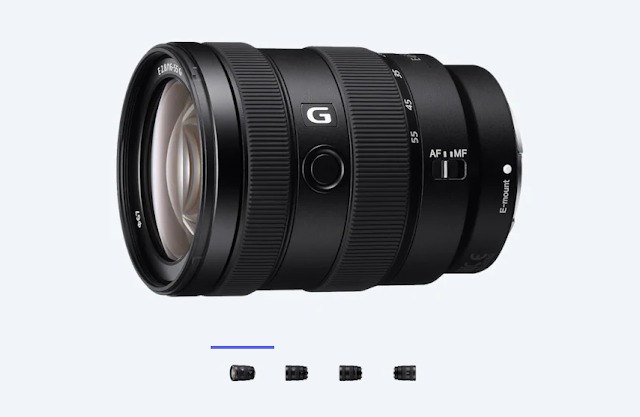
Sony A6600 and Sony A6100. These are the latest mirrorless cameras from the Japanese giants. One is aimed at professional with high end specs while the other one is targeted at a entry level, first time user audience. Sony had earlier launched A6400 - another APS-C size camera which was aimed at vloggers and offered a mic input as well as a flip up screen. Sony has also announced two new APS-C lenses - Sony E 16-55mm f/2.8 G Lens and Sony E 70-350mm f/4.5-6.3 G OSS Lens.


Sony A6600 Specs and Features

Basically A6600 is spec-wise same as the earlier launched A6400. The newest model feature IBIS ( in body image stabilization ) which was missing on the A6400. 
  • Sony E Mount
  • 24.2 MP CMOS sensor with max resolution of 6000x4000
  • IBIS - 5 axis, Sensor shift
  • ISO 100 to 32000 ( extended up to 102400 )
  • Up to 11fps continuous shooting 
  • Interval timer to create Timelapse
  • 4K @ 24fps/25p/29.97p XAVC S
  • 4:2:2 8-Bit external recording
  • Mic and Headphone jacks
  • Flip up screen
  • No built in Flash
  • 2.3M dot EVF
  • Wifi, Bluetooth
Sony Alpha A6600 is priced at $1,398.00 ( body only ). In India, the price for this model would be around Rs 1,05,000 MRP ( check here : Amazon.in )

Sony A6100 Specs and Features
  • SVGA Tru-Finder 1.44m-Dot OLED EVF
  • UHD 4K30p and Full HD 120p Video
  • 24.2MP APS-C Exmor CMOS Sensor
  • BIONZ X Image Processor
A6100 is a long due update to A5100 launched way back in 2014. It features a 24.2MP sensor like the A6400 and A6600, but it is not clear the sensor on this is the same as the others. It is mainly aimed at first time mirrorless camera buyers and hence are missing some pro features. While A6600 sports Realtime Eye AF, the A6100 only has regular subject tracking AF - don't get me wrong here, this is excellent as well. There is no IBIS build in and many of the Pro video features are missing. 

Sony A6100 Price in the US : $748.00 ( body only ) / $848.00 ( with 16-50mm lens ) / $1,098.00 ( with 16-50mm + 50-210mm lens combo )

Sony A6100 price in India is expected to be around Rs 59,999 MRP ( body only ) ( Check here : Amazon.in )

Image Gallery


Comments

  1. This comment has been removed by a blog administrator.

    ReplyDelete
  2. This comment has been removed by a blog administrator.

    ReplyDelete

Post a Comment

Popular posts from this blog

[ Solved ] SBI ATM 055 Ineligible Transaction Error FIX

Are you experiencing 055 Ineligible Transaction Error every time when you use your SBI ATM Card ? I have a easy FIX for you. What is SBI 055 Ineligible Transaction Error ? It means you are doing a transaction which you or your bank has blocked for security or safety issues. Normally, a user blocks International Usage of a particular Debit / Credit card so that it won't be used by hackers or scammers from other parts of the world. The reason why you are seeing this 055 error in India is probably because your ATM Card's Domestic Usage option is Disabled - either you accidently disabled or your Bank Branch did it. Don't worry. It's easy to fix it. Go to  https://www.onlinesbi.com/  and login with your internet banking username and password. Go to ATM Card Services in the Menu, Select the Card you are have issues and the Click on Change Channel Type . You can see the current status of your Domestic Usage when you click on that. If it's Disabled, simply enab...

[ FIX ] Ubuntu 20.04 Bluetooth doesn't Turn On

I have been using a Logitech Bluetooth keyboard for a while now with my Ubuntu 20.04. Everything worked well without any issues until one day the operating system refused to turn on the Bluetooth. I could toggle Bluetooth On button from the Settings, but it did nothing.  After spending some time Google Searching why my Bluetooth started not working all of a sudden, and after trying a variety of commands to troubleshoot the problem, I finally found a working fix for this issue. Open a Terminal ( Ctrl + Alt + T )  and enter below commands one after another.  sudo rmmod btusb sudo modprobe btusb That's it. Your Bluetooth issue would be now solved.  I can guarantee you this problem is going to pop-up every now and then. So copy the above commands to a text file for future uses. Sometimes, even after entering above commands the bluetooth would refuse to turn on. In such cases, just Suspend the system and then wake up it again and check.

Reduce External Monitor Brightness on Ubuntu 20.04, 21.10

External Monitors are a great addition to any workspace. I have a Full HD Benq one connected with my laptop via HDMI cable to do multi-tasking. What I don't like about this setup is the external screen is still very bright even after setting it to the lowest possible setting via physical buttons present on the monitor. Changing brightness on the Laptop doesn't affect the brightness of the external monitor. However, In Ubuntu, you can adjust the brightness level of any connected monitor by opening up a terminal/command line and entering a few comments. Xrandr is the command we would be using to achieve this. How to change External Monitor Brightness on Ubuntu Linux Open a Terminal ( Ctrl + Alt + T ) Enter the command xrandr -q | grep " connected" and press Enter. Find the external monitor name displayed in this command's output. In my case, it is  HDMI-1 To change the brightness enter this command xrandr --output HDMI-1 --brightness 0.5 and press Ente...