Sony Alpha A6100 ( ILCE-6100L, ILCE-6100Y )- the successor to hugely popular A6000 is in stock online in India on Amazon. It comes in two kit lens combos.
ILCE-6100L ( Body + 16-50mm lens ) is price at Rs 75,990 MRP. ILCE-6100Y ( Body + 16-50mm + 55-210mm lenses ) is price at Rs 89,990. If you already have E-mount lenses, you can get the Body Only ( ILCE-6100 ) priced at Rs 64,990.
Check out the current lowest prices for Sony A6100 in India here
A6100 Lowest Prices Online in India ( Jan 2020 )
Specs and Highlights
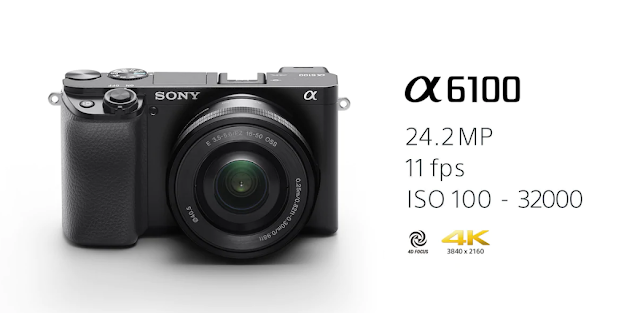
A6100 is Sony's latest Entry-Level Mirrorless camera. It's replacing older A6000 and A5100 cameras. A6100 features a 24.2MP APS-C size sensor and takes E-mount lenses. Sony's older A-mount lenses are not compatible with A6000 series of cameras ( you can use an adapter to attach them though ).
A6100 comes with a 180 degree tiltable screen and has touch support. You can flip up 180 degree and shoot selfies or record vlogs. You can tap in on the screen to get focus on an area you want the camera to focus. This is a great feature to have, especially for first time camera buyers.
The camera is lightweight and easy to carry around. 4K @ 30fps recording is supported. There is no build in image stabilization available, but you can use the stabilization on the lens ( OSS lenses ) to get shake free images.
A6100 comes with first user friends modes such as Intelligent Auto and Superior Auto. There are a lot of other creative / fun modes available as well. Eye AF for both Humans and Animals are available as well, that let you focus right on the eye when shooting portraits.
If you are buying this camera, i would recommend you get ILCE-6100Y version which comes with 2 lens combos. Buying 55-200mm separately will cost you much more than when bought with the camera.
ILCE-6100L ( Body + 16-50mm lens ) is price at Rs 75,990 MRP. ILCE-6100Y ( Body + 16-50mm + 55-210mm lenses ) is price at Rs 89,990. If you already have E-mount lenses, you can get the Body Only ( ILCE-6100 ) priced at Rs 64,990.
Check out the current lowest prices for Sony A6100 in India here
A6100 Lowest Prices Online in India ( Jan 2020 )
- ILCE-6100L : Rs 67,990
- ILCE-6100 - Body Only : Rs 57,990
- ILCE-6100Y - 16–50 mm and 55–210 mm Zoom Lenses - Rs 79,990

Specs and Highlights
A6100 is Sony's latest Entry-Level Mirrorless camera. It's replacing older A6000 and A5100 cameras. A6100 features a 24.2MP APS-C size sensor and takes E-mount lenses. Sony's older A-mount lenses are not compatible with A6000 series of cameras ( you can use an adapter to attach them though ).
A6100 comes with a 180 degree tiltable screen and has touch support. You can flip up 180 degree and shoot selfies or record vlogs. You can tap in on the screen to get focus on an area you want the camera to focus. This is a great feature to have, especially for first time camera buyers.
The camera is lightweight and easy to carry around. 4K @ 30fps recording is supported. There is no build in image stabilization available, but you can use the stabilization on the lens ( OSS lenses ) to get shake free images.
A6100 comes with first user friends modes such as Intelligent Auto and Superior Auto. There are a lot of other creative / fun modes available as well. Eye AF for both Humans and Animals are available as well, that let you focus right on the eye when shooting portraits.
If you are buying this camera, i would recommend you get ILCE-6100Y version which comes with 2 lens combos. Buying 55-200mm separately will cost you much more than when bought with the camera.
Comments
Post a Comment